Simplifying Access to Online Resources (Browser Extensions)

Simplifying Access to Online Resources (Browser Extensions)

Updated July 25, 2026

Click & Read: Access the full text of publications

Developed by the CNRS, Click & Read is a browser extension (Firefox, Safari, Chrome, Edge) that provides access to the full text of publications as soon as you visit web pages that include bibliographic references (Google Scholar, publisher websites, Wikipedia, etc.).
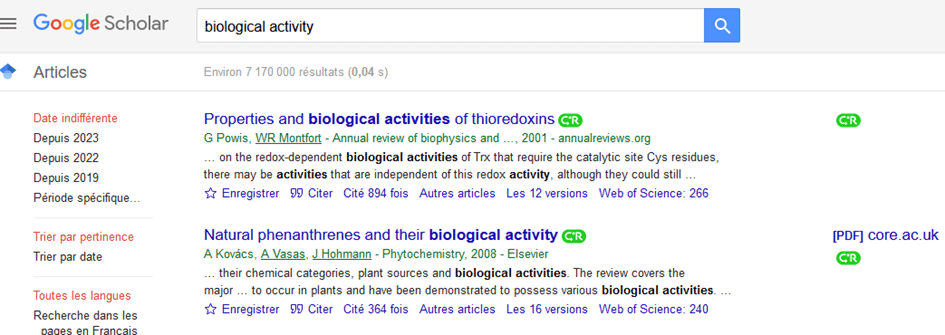
Screenshot of Google Scholar

Using the reference’s identifier (DOI, PMID), Click & Read provides immediate access to the publication as long as the University of Montpellier has the resource or it is available as open access (for example, HAL). The extension indicates access with its logo: click on it to view the full-text document.

Install and Configure Click & Read

  1. Follow the installation guide at clickandread.inist.fr. Once the installation is complete, the Click & Read logo will appear in your browser's toolbar: click on it.

  2. The sources “Unpaywall, ” “Istex,” and “Panist” are already selected. Add “Montpellier” to include the University of Montpellier’s subscriptions.

  3. If you have access to BibCnrs, you can also select your authorized fields.

  4. Finally, enable the libraries in Google Scholar, then save.
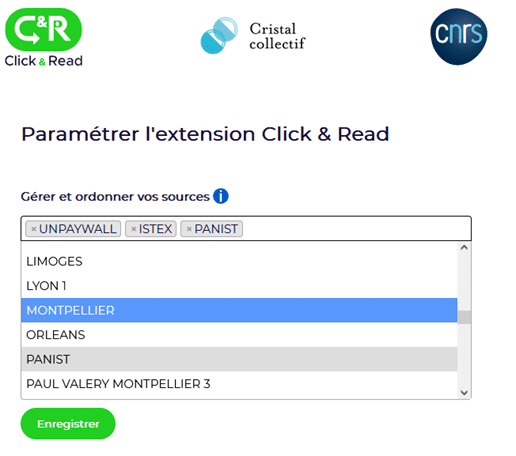
Illustrative image showing the settings for the Click & Read browser extension
Illustrative image showing the settings for the Click & Read browser extension (Step 2 of the tutorial)

Ophirofox: Read subscriber-only news

Ophirofox (Firefox, Chrome) is a browser extension that allows you to view the full version of “subscriber-only” content while browsing nearly 20 news websites (Le Monde, Libération, Courrier International, etc.).

For articles on these sites that are “for subscribers only,” Ophirofox adds a “Read on Europresse” button.

Screenshot of the "Play" button on Europresse, as displayed by Ophirofox

When you click this button, you will be taken to the login page (ENT credentials) and then to Europresse, where you can read the full article.

Install and Configure Ophirofox

  1. Install the extension: for Chrome or for Firefox.

  2. Once the installation is complete, go to the “Options” tab and select “University of Montpellier.”

News outlets supported by Ophirofox

  • National press: L’Express , L’Humanité, La Croix, Le Figaro, Le Monde Diplomatique, Le Monde, Le Point, Libération.
  • Regional newspapers: La Dépêche du Midi, La Montagne, La Provence, La Voix du Nord, Le Parisien, Ouest France, Sud Ouest.
  • Foreign press: Courrier international, La Libre Belgique, Le Soir (Belgium), Le Temps (Switzerland).

Frequently Asked Questions


Ophirofox. On nearly 20 news websites, it adds a “Read on Europresse” button to subscriber-only articles; after you log in with your ENT credentials, this button opens the full article on Europresse.

Install the extension for Chrome or Firefox from the official links, then, in the "Options" tab, select University of Montpellier.

The national press (L’Express, L’Humanité, La Croix, Le Figaro, Le Monde Diplomatique, Le Monde, Le Point, Libération), the regional press (La Dépêche du Midi, La Montagne, La Provence, La Voix du Nord, Le Parisien, Ouest France, Sud Ouest), and the foreign press (Courrier international, La Libre Belgique, Le Soir, Le Temps).

Developed by the CNRS, Click & Read provides access to the full text of publications as soon as users browse pages that mention bibliographic references (Google Scholar, publisher websites, Wikipedia, etc.). Using the DOI or PMID, it opens the publication as long as the UM has the resource or it is available as open access (for example, HAL).

Follow the guide at clickandread.inist.fr. Once the extension is installed, its logo will appear in the browser toolbar. The sources Unpaywall, Istex, and Panist are already selected: add “Montpellier” to include UM subscriptions, select your BibCnrs domains if applicable, enable libraries in Google Scholar, and then save.

Click & Read works on Firefox, Safari, Chrome, and Edge. Ophirofox works on Firefox and Chrome.

Click & Read opens the publications as soon as the UM has the resource available, after adding the source “Montpellier,” or when they are open access. Ophirofox opens the article on Europresse after you log in with your ENT credentials.

Other tools

Check out these additional resources to get the most out of university library tools: